The reverse chronological resume format lists your most recent job first, then each job before it, back to the oldest one you include. Education follows the same newest-first rule. A reader sees what you do now before anything else, and the dates let software count your years of experience.
A promotion, two jobs at once, a gap or a return to an old employer makes the order less obvious. ClayCV's resume checker sorts roles by their end date, and that one rule settles most of these cases.
What is reverse chronological order?
Reverse chronological order means newest to oldest. It is not oldest to newest. That's plain chronological order, which starts with your first job.
On resumes the two names mean the same thing. A "chronological resume" is almost always built newest first, because a reader wants to see what you do now. A resume that truly starts with your first job is rare, because it puts your oldest work where the reader looks first.
The order applies inside each dated section. Your experience runs newest to oldest. So does your education, and so do certifications or projects if they have dates.
What a reverse chronological resume format looks like
A resume in this format has a header, a short summary, then experience with the current job on top. Skills and education come after.
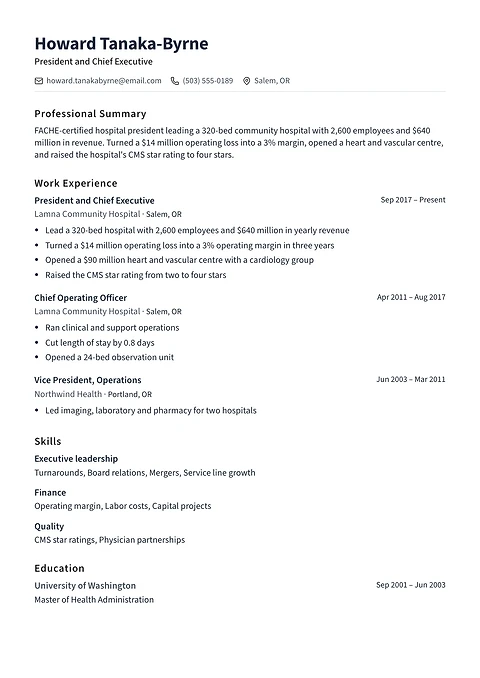
Resume example
Newest first, top to bottom: the current role ends in "Present", the promotion at the same hospital sits directly below it, and the oldest job comes last. Education sits at the bottom. The person and content are illustrative.
Use this template- Header. Name, the job title you're aiming for and contact details.
- Summary. Two to four sentences on who you are and your best result. See [what goes in a resume summary](/blog/what-is-a-resume-summary).
- Experience. Your current or latest job first. This is the section the format is built around, so make each bullet a result. A [bullet point writer](/resume-bullet-point-generator) can help with that.
- Skills and education. Either order works once you have a few years of work behind you. Both keep the newest-first rule where they have dates.
Every ClayCV design follows this layout, so you can start from any of our reverse chronological resume templates and fill in your own history.
How to put your jobs in order
Sort by end date, newest first. A job you still hold ends in "Present", which counts as the newest date of all. That's the rule ClayCV's resume checker uses: it reads the end date of each role and warns you when the roles don't run newest first.
End dates work better than start dates because they show what you did most recently. Here's one illustrative person, Priya Nair, a data analyst. Her employers and dates are made up.
| Role | Employer | Dates | Position on the page |
|---|---|---|---|
| Senior Data Analyst | Harbourline Insurance | Mar 2023 to Present | 1st |
| Data Analyst | Harbourline Insurance | Jun 2021 to Feb 2023 | 2nd |
| Junior Analyst | Copperleaf Retail | Aug 2019 to May 2021 | 3rd |
| Sales Assistant (part-time, while studying) | Copperleaf Retail | Sep 2017 to Jul 2019 | 4th, or cut it |
If two jobs end in the same month, put the one that started later first. If both still say "Present", lead with the one that matters most for the job you're applying for.
Junior Analyst, Copperleaf Retail, Aug 2019 to May 2021
Senior Data Analyst, Harbourline Insurance, Mar 2023 to Present
Data Analyst, Harbourline Insurance, Jun 2021 to Feb 2023
Why it doesn’t work
The reader sees her first job first and has to hunt for the one she does now.
Senior Data Analyst, Harbourline Insurance, Mar 2023 to Present
Data Analyst, Harbourline Insurance, Jun 2021 to Feb 2023
Junior Analyst, Copperleaf Retail, Aug 2019 to May 2021
Promotions, overlapping jobs and gaps
In each of these cases the end-date rule still holds in a reverse chronological resume format. What changes is where the entry goes:
| Case | What to do |
|---|---|
| Promotion at the same employer | List each title as its own entry, newest first, with its own dates. You can also put the employer once and stack the titles under it. Both show the step up. |
| Two jobs at the same time | Sort by end date as usual. If a side job would push your main job down, move it to a separate section such as "Freelance work". Keep it newest first there too. |
| Back at an old employer | Give each spell its own entry in its own date position. Don't merge them into one long date range. |
| A gap of several months | Leave the jobs in order. If the gap is long, add a one-line entry in its place, such as "Career break: caring for a family member". |
| Contract or temp work | Group short contracts under one entry, like "Contract data analyst, 2022 to 2023", and name the clients in the bullets. |
Overlapping dates are fine. A recruiter can see that a weekend job ran alongside a full-time one, as long as every entry follows the same end-date rule.
Reverse chronological order for education and other sections
Education runs newest first as well. A master's degree goes above the bachelor's degree it built on. A course you finished this year goes above an older one.
- DoPut education below experience once you have a year or two of relevant work.
- DoMove education to the top if you're a student or a recent graduate and your degree is your strongest point.
- DoDate certifications and projects and list them newest first, like your jobs.
- Don’tDon't list school next to a degree. Once you have a degree, the school entry adds little.
- Don’tDon't drop dates to hide age or gaps. A section with no dates reads as if something is missing.
How many older jobs to keep depends on how much room you have. See how many pages to aim for before you cut or keep an early role.
Reverse chronological vs functional and hybrid formats
There are three common layouts. They differ in what leads the page. The third, a functional resume, groups experience by skill and plays dates down. Without dates, a reader can't tell what you did when, so ClayCV doesn't offer one. For most people the choice is between these two:
Reverse chronological
Jobs lead, newest first
- Shows your current role and how you got there
- Suits most people with a steady work history
- Every job has dates, so gaps show
Hybrid
Skills lead, then jobs
- A short skills block at the top, then jobs newest first
- Helps career changers whose old titles don't match the new field
- Still gives the reader a dated history
Who should not use a chronological resume? Very few people. If your recent jobs don't match the role you want, use a hybrid: put a skills section above your experience and keep the jobs in order. See which skills to list for that section. On ClayCV you can move the skills section up in any template.
Dates that recruiters and software can read
The order only helps if every date is clear. Application software works out your years of experience from your dates. A date it can't read means experience it can't count.
Mistake
Mixed date styles
"Jan 2021" in one job, "01/2019" in the next and "2017" in another.
Instead
Pick one style, such as "Jan 2021", and use it for every date.
Mistake
Two-digit years
"Aug '14" can be misread when software works out your experience.
Instead
Write the full year: "Aug 2014".
Mistake
A range split over two lines
The start date on one line and the end date below it. Software often misses ranges written this way.
Instead
Keep each range on one line, like "Jan 2019 to Present".
Mistake
No end date
A current job with only a start date reads as unfinished.
Instead
End it with "Present".
Mistake
Missing dates
A job with no dates at all.
Instead
Add a start and end date to every role.
Each of these is a separate check in a resume checker, along with whether your roles run newest first.
Check your order before you apply
Read your resume from the top, as a recruiter would:
- First job, current job. Is the first role in your experience the one you hold now, or your latest?
- End dates fall as you read down. Does each role end at the same time as or before the one above it?
- Promotions read upward. Is your higher title above the lower one at the same employer?
- Side jobs don't block the main one. If a part-time role pushes your main job down, have you moved it to its own section?
- One date style. Do all dates use the same style, with four-digit years and each range on one line?